
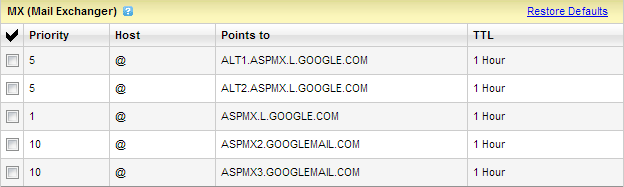

Do you have your own domain and would like to use it with Gmail? For example, you purchased yourowndomain.com and would like to have an email account such as admin@yourowndomain.com and you need a mail space that is bigger that the usual 100 – 200MB bundled email account from your domain registrar, then Gmail is a good choice for you.
The concept is simple, replace gmail.com with yourowndomain.com but continue using Gmail service.
With Gmail, you can have 7 GB+ of mail space and can create up to 50 mail accounts for your customized domain.
No matter where you have bought your domain and where you have hosted your site, you can always use Gmail as your email service.
Below are the Instructions.
Below are the Instructions.
1. Sign up to Google Apps (free) here.
2. Fill in the domain field with your own domain and then click submit.
3. The fields below it will become active and fill in the required information. Click “I accept! Create my account >>”
4. You’re almost done. Follow the setup wizard to setup your Google Apps.
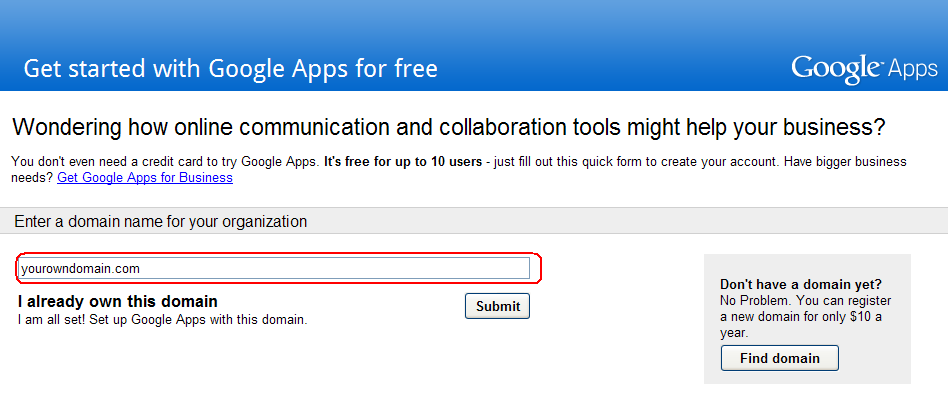
5. In setting up Gmail. You also need to setup your MX records. Go to your hosting account and log-in to control panel. Go to DNS Records and add/create new MX records. Hostname should be your domain and the Type should be MX or MX(Custom). If the TTL value of your host is in seconds, use 300; but if in hours (hr), use 1 hour. The Priority values should not be interchanged.
Please see the details below.
| Hostname | Type | Priority | Value | TTL |
| yourdomain.com | MX | 1 | ASPMX.L.GOOGLE.COM | 1 Hour |
| yourdomain.com | MX | 5 | ALT1.ASPMX.L.GOOGLE.COM | 1 Hour |
| yourdomain.com | MX | 5 | ALT2.ASPMX.L.GOOGLE.COM | 1 Hour |
| yourdomain.com | MX | 10 | ASPMX2.GOOGLEMAIL.COM | 1 Hour |
| yourdomain.com | MX | 10 | ASPMX3.GOOGLEMAIL.COM | 1 Hour |
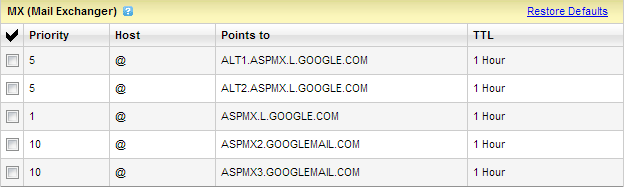
If the above records does not work for your host, please visit this link for specific records and instructions for your registrar or host.
Please take note that DNS changes may take effect for 1 to 48 hours.
No fund to pay for a custom domain. You can have a free one here.
Still have problems? Leave your comments below.

I noticed a sudden traffic spike from this article so I need to issue a clarification. Please note that this article is dated Feb 2012. That time, Google was still accepting free sign ups to its Apps Service. The free service, however, was discontinued since December of the same year (2012).
You can still use this service but you now need to pay.
Thank you